How to Beat ATS and Get Hired for Remote Jobs in 2026 (The Complete Guide)
Most remote job applications never reach a human. They are filtered out by an Applicant Tracking System before a recruiter ever sees your name. This guide breaks down exactly how ATS works in 2026, the resume format that passes every scan, and the keyword strategy that gets you to the interview stage — even in the most competitive remote job markets.
Written by
Aditya
You applied for 50 remote jobs last month.
You heard back from two.
And here is the part that stings: it probably had nothing to do with your qualifications.
It had everything to do with a piece of software you have never seen, never spoken to, and never had the chance to impress.
It is called an Applicant Tracking System — ATS for short. And right now, it is quietly rejecting your resume before a single human being ever reads it.
The good news is that once you understand how it works, beating it is not complicated. It does not require a fancy resume designer. It does not require you to game the system with tricks that might backfire.
It requires knowing exactly what the system is looking for — and giving it precisely that.
This guide will show you everything. How ATS works, what it actually scores, how to format your resume so it gets through every time, and how to apply for remote jobs in a way that puts you ahead of 90% of other candidates.
Let us start with the part most people get completely wrong.
What Is an ATS and Why Should You Care?
An Applicant Tracking System is software that companies use to collect, organise, and filter job applications.
When you hit submit on a job application, your resume does not land in a human inbox. It gets uploaded into a database. The ATS scans it, extracts information, checks it against the job requirements, and assigns it a score. Only the highest-scoring resumes get passed along to a recruiter.
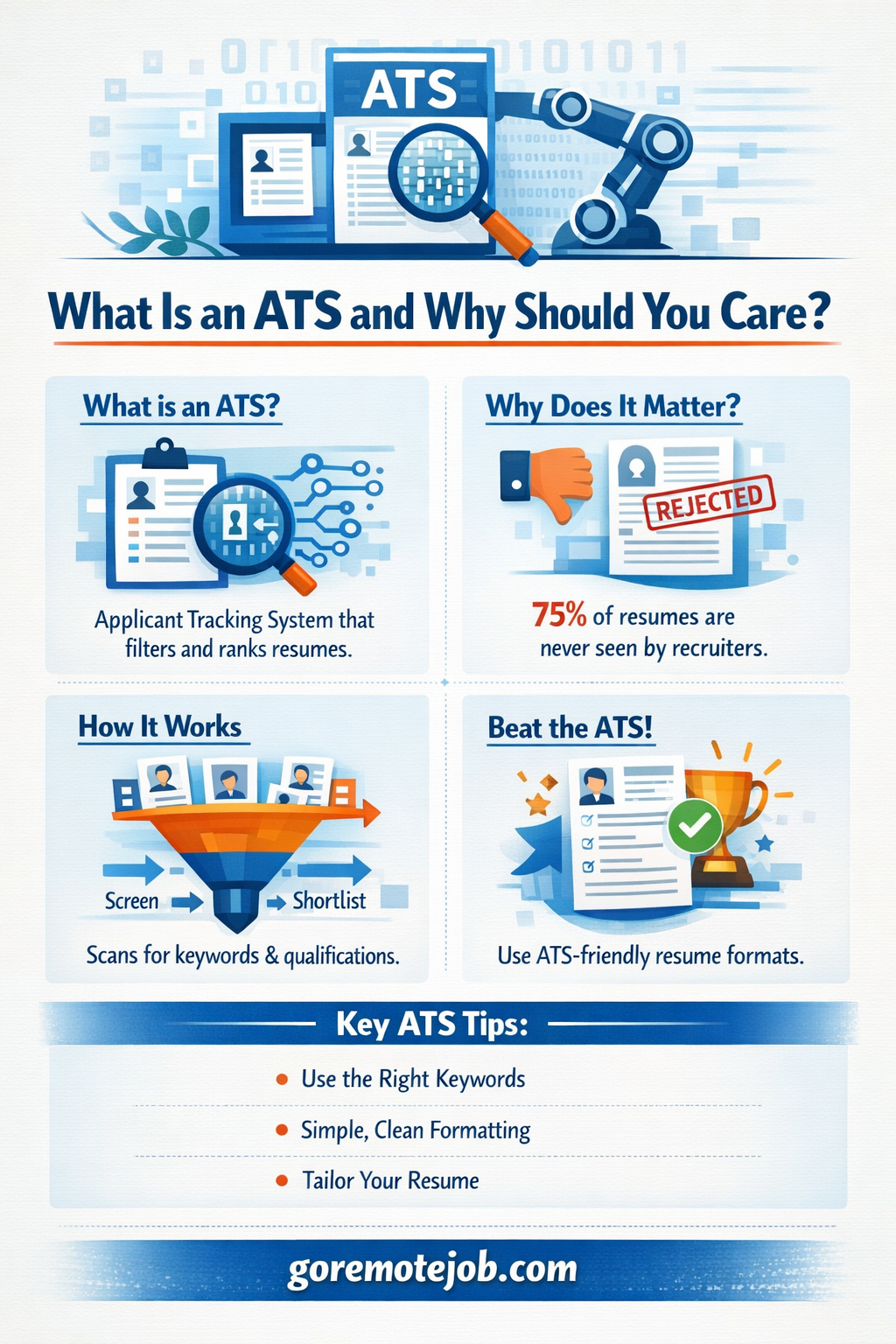
Here is how widespread this has become. Nearly 99% of Fortune 500 companies use an ATS. And the problem is significant — research shows that 88% of employers believe they lose highly qualified candidates who are screened out because their resumes are not ATS-friendly.
Think about that for a moment. Nearly nine out of ten employers acknowledge their own system is rejecting good candidates. The system is imperfect. But it is not going anywhere. So you need to learn to work with it.
The ATS does not know you are a great candidate. It only knows what it can read. If your resume is formatted in a way the system cannot parse, your experience, skills, and achievements become invisible.
Remote jobs are especially competitive. A single remote job posting can attract hundreds or thousands of applications from candidates around the world. Companies use ATS because without it, the hiring process would be completely unmanageable. Understanding this context changes how you approach every application.
How ATS Actually Scores Your Resume in 2026
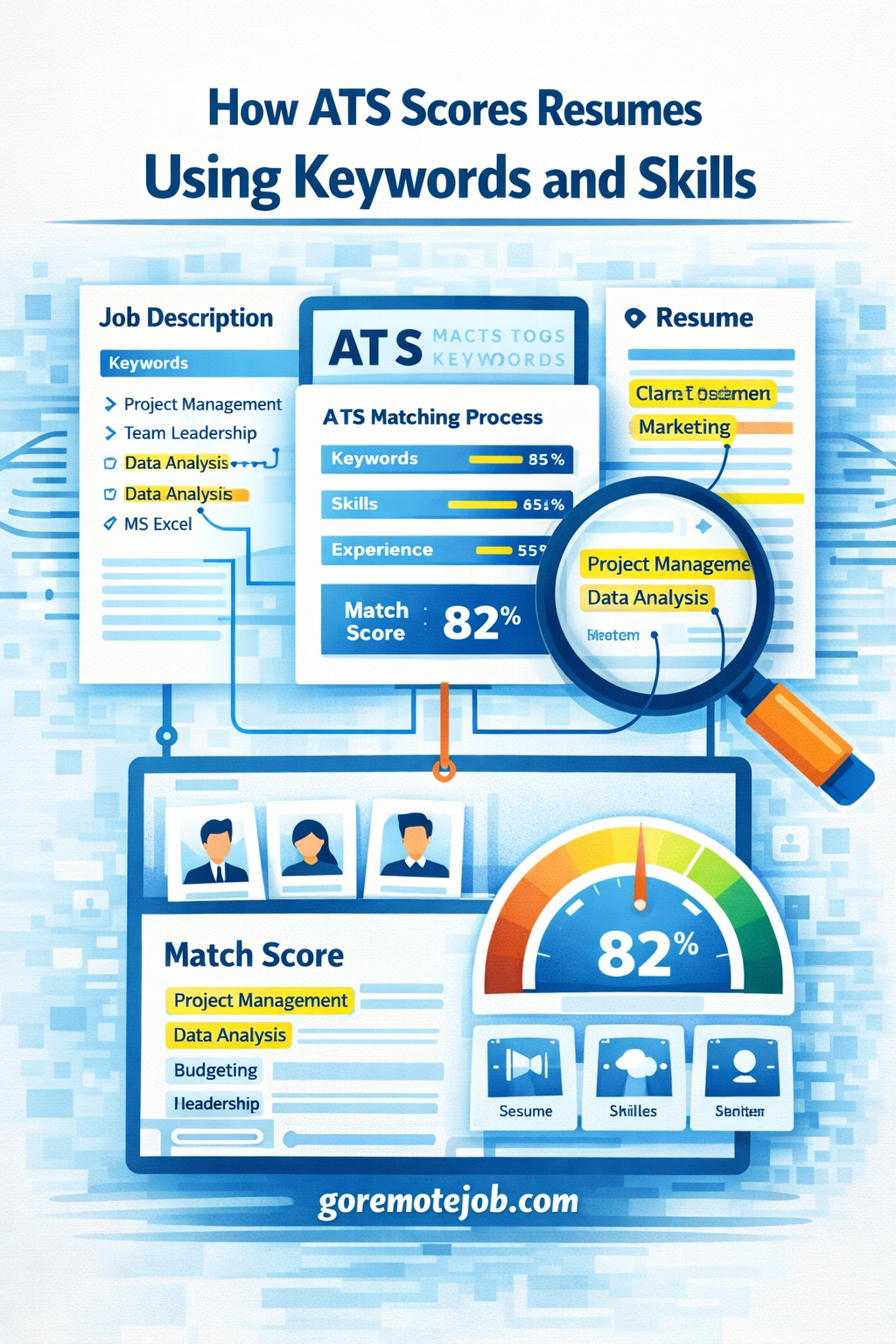
Modern ATS platforms in 2026 are not just checking for keywords. They have become significantly more sophisticated, with AI-enhanced parsing that evaluates multiple factors simultaneously.
Here is what the system is actually looking at when it scans your resume.
1. Keyword Matching
This is still the most important factor. The ATS compares the words in your resume against the words in the job description. If a job posting says "project management" and your resume says "programme coordination", the system may not connect them — even though they mean roughly the same thing.
The fix is straightforward. Read every job description carefully. Identify the specific language the employer uses. Mirror that language in your resume where it accurately reflects your experience.
A resume matching 70–80% of the required skills and keywords in a job description is generally considered competitive. Aim for that range on every application you submit.
2. Skills Recognition
ATS systems are trained to recognise skills — both technical and soft. Technical skills like Python, Google Analytics, Salesforce, or QuickBooks are easier for the system to identify. Soft skills like leadership and communication are increasingly recognised by AI-powered ATS platforms, but only when supported by context.
Do not just list "communication skills" in a bullet point. Show communication in your experience descriptions. Write "presented monthly performance reports to a team of 12 stakeholders" — that sentence signals communication skill far more powerfully than the phrase alone.
3. Formatting Parsability
The ATS reads your resume from top to bottom. If it encounters a table, a graphic, a text box, or a multi-column layout, it can get confused and scramble the information it extracts. In some cases, key sections of your resume become completely unreadable to the system.
This is the single most common reason highly qualified candidates get rejected. Their resume looks beautiful as a visual document. But the ATS sees garbled text and missing sections.
4. Quantified Achievements
Modern ATS platforms increasingly weight resumes that contain measurable results. Numbers signal real impact. They are also easier for AI to parse and score.
"Managed social media accounts" is vague and scores poorly.
"Grew Instagram following from 2,000 to 18,000 in 9 months, increasing website traffic by 34%" is specific, measurable, and scores well.
Every bullet point describing your work experience should contain a number wherever possible.
5. Job Title and Contact Information
ATS systems look for the job title you are applying for. Including the exact job title from the posting — in your resume headline or professional summary — significantly improves your match score.
Contact information must be in the main body of your resume, not in headers or footers. Many older ATS systems simply cannot read content placed in header or footer sections. Your phone number and email address could be invisible to the system if placed there.
The Exact Resume Format That Beats ATS in 2026
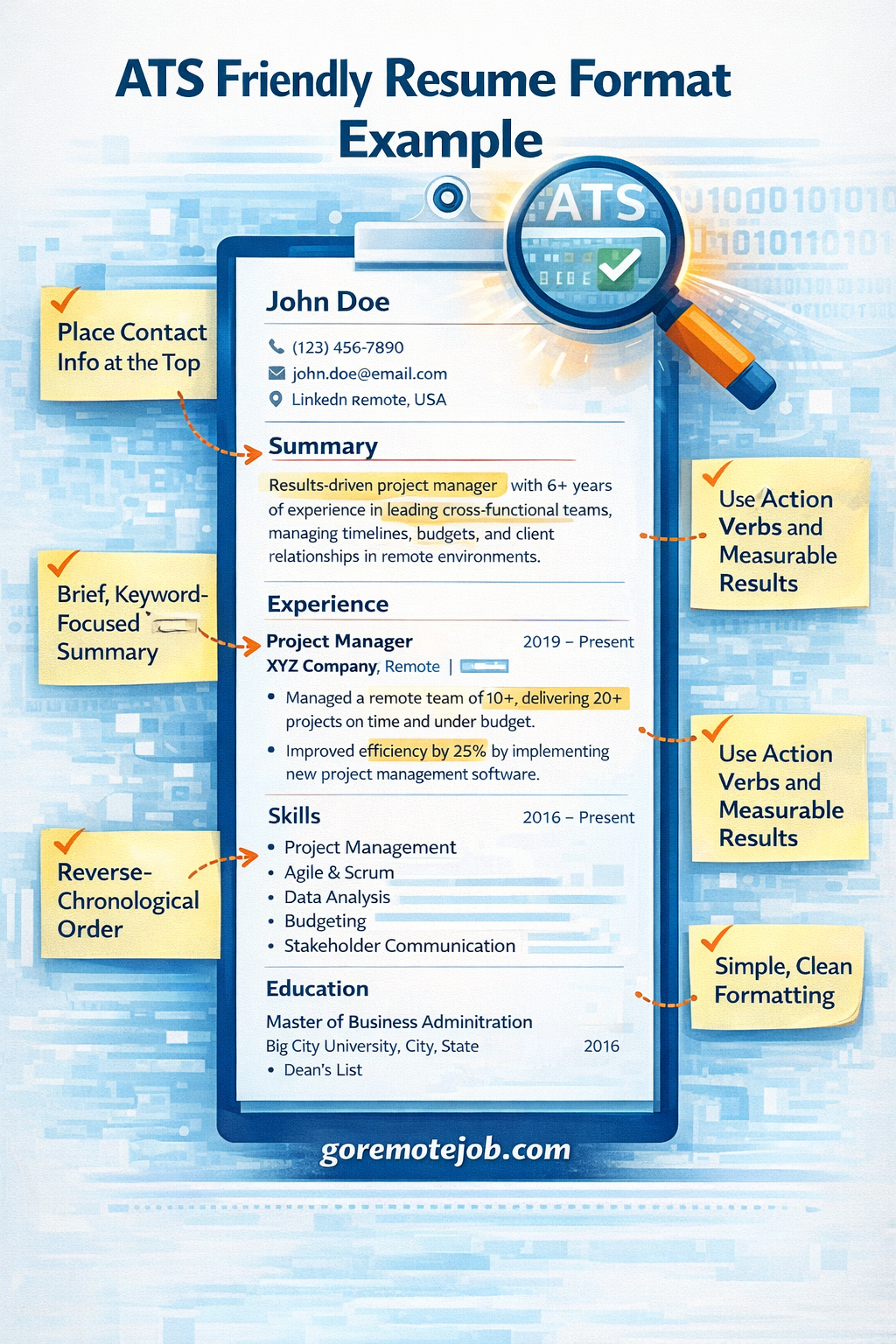
Now that you know what the system is scoring, here is the formatting framework that maximises your ATS pass rate while still creating a strong impression for the human who reads it next.
File Format: PDF vs. DOCX
This question comes up constantly. Here is the definitive answer.
Both .docx and text-based PDF formats work with most modern ATS platforms. However, there is an important distinction: the PDF must be text-based, not image-based. A scanned PDF, or a PDF exported from a heavily designed tool like Canva, may be treated as an image — meaning the ATS cannot read any of the text inside it at all.
When in doubt, .docx is the safer choice. It is consistently reliable across all ATS platforms, including older systems that some mid-sized companies still run. If the job posting specifies a format, always follow that instruction.
Never submit a Canva PDF with graphics and columns. It may look impressive to the human eye, but it will almost certainly fail the ATS scan.
Layout: Single Column Only
This is non-negotiable.
Multi-column layouts are one of the most common resume formatting mistakes. They look clean and modern to a human reader. To an ATS, a two-column layout causes the system to read across both columns simultaneously, creating a jumbled, unreadable output.
Use a single-column layout. Left-aligned text. Clear section breaks. Simple horizontal lines if you want visual separation. Nothing more.
Fonts: Keep It Standard
Use only standard, widely supported fonts. The best choices in 2026 are Arial, Calibri, and Aptos. These fonts are universally readable by ATS systems and look professional to human reviewers.
Font size should be 10–12pt for body text and 14–16pt for section headings. Do not go smaller to fit more content on a page. A font below 10pt may cause parsing issues in some systems and will definitely frustrate the hiring manager who reads it after.
Page Length: One or Two Pages Maximum
For most remote job applicants, the rule is straightforward.
Entry-level or recent graduate: one page
Mid-level or senior professional: two pages maximum
Academic or research roles: three to five pages is acceptable
The exception is almost never worth making. Hiring managers have seconds to scan your resume before deciding whether to continue reading. A two-page resume that is tight, specific, and results-focused will always outperform a three-page resume padded with outdated roles and vague responsibilities.
If your resume runs long, cut older roles first. A position you held 15 years ago is unlikely to be the reason you get hired today. Keep your most recent and relevant experience front and centre.
Section Headings: Use Standard Labels
ATS systems are trained to recognise specific section heading names. Sticking to conventional labels prevents the system from misclassifying your content.
Use these exact headings:
Professional Summary
Work Experience
Skills
Education
Certifications
Do not use creative alternatives like "My Journey", "What I Bring", or "Career Highlights". The ATS may not recognise these and could miscategorise the content that follows, hurting your score.
Design Elements: Less Is Always More
Remove all of the following from your resume immediately:
Photos or headshots — never include these when applying for US or UK remote jobs
Skill bars or proficiency graphics — the ATS cannot read them and they look unprofessional
Icons and symbols — these often become unreadable characters when parsed
Tables — confuse ATS parsing and should be avoided entirely
Text boxes — content inside text boxes is frequently invisible to ATS systems
Coloured backgrounds or shading behind text
Your resume does not need to be beautiful. It needs to be readable — by a machine first, then by a person. Clean, well-spaced text with clear section breaks will outperform a designer resume every single time.
The ATS Keyword Strategy That Actually Works
Most advice about ATS keywords tells you to "stuff keywords into your resume". That advice is wrong — and increasingly counterproductive.
Modern ATS platforms are AI-powered. They understand context, not just exact matches. Keyword stuffing looks unnatural to both the machine and the human who reads your resume next. Some ATS systems will actually flag resumes that appear to be gaming the system.
Here is the approach that works.
Step 1: Analyse the Job Description
Read the job description carefully three times. On the first read, understand the role. On the second, identify the most repeated terms — these are the skills and qualifications the employer cares most about. On the third, note any specific tools, platforms, or methodologies mentioned.
Identify three to five core keywords that appear multiple times or are listed as requirements. These must appear in your resume.
Step 2: Match Language, Not Just Concepts
If the job description says "remote team management", do not write "led distributed workforce". Write "remote team management".
If the posting mentions "Google Analytics 4", do not just write "web analytics". Write "Google Analytics 4".
ATS systems increasingly handle synonyms and variations, but exact matches are always safer. When in doubt, use the employer's exact phrasing.
Step 3: Include Both Acronyms and Full Terms
Write "Search Engine Optimisation (SEO)" rather than just "SEO". Write "Customer Relationship Management (CRM)" rather than just "CRM".
Different ATS systems may search for the acronym, the full term, or both. Covering both versions ensures you match regardless of how the recruiter has configured their search.
Step 4: Distribute Keywords Naturally
Do not cluster all your keywords into a skills section at the bottom. Weave them throughout your resume — in your professional summary, in your work experience bullet points, and in your skills section.
A keyword appearing in multiple sections carries more weight than a keyword appearing once. It also reads naturally, because it is supported by context.
Step 5: Customise Every Application
This is the step most people skip because it takes time.
Using the same resume for every job application is one of the highest-impact mistakes you can make. Each job description is different. Each set of keywords is different. A resume optimised for one role may score 45% on a different role with slightly different language.
Create a master resume with all your experience documented. For each application, spend 20–30 minutes tailoring the language of your summary and bullet points to match the specific job description. Over time, you will build a library of tailored versions that makes this process faster.
Specific Rules for Remote Job Applications
Remote job applications have some specific considerations that standard resume advice does not cover.
Signal That You Can Work Remotely
Many hiring managers screening remote candidates are specifically looking for evidence that you have worked remotely before and can do so effectively. If you have remote work experience, say so explicitly in your work experience section.
Write "Fully remote — managed stakeholders across three time zones" or "Remote position — collaborated with US and UK teams using Slack, Zoom, and Notion". This tells the recruiter immediately that you understand what remote work actually requires.
Include Remote Work Skills
There is a specific set of tools and skills that remote employers look for. Include these in your skills section if they are relevant to your experience:
Communication tools: Slack, Microsoft Teams, Zoom
Project management: Asana, Trello, Monday.com, Notion, Jira
Documentation: Confluence, Google Workspace, Notion
Time management and self-direction — demonstrate this through results, not just claims
Do Not Include Your Full Address
For remote roles, listing your full home address is unnecessary and potentially counterproductive. Some ATS systems and hiring managers filter by location even for remote roles — if they see an address in a country or region they were not expecting, it may raise questions.
Instead, list your city and country, or simply your time zone. "London, UK" or "EST time zone" tells the employer everything they need to know.
Apply Within 24 Hours of Posting
Remote jobs attract global talent pools. A compelling remote role at a well-known company can receive hundreds of applications within the first 48 hours.
Apply as early as possible. Studies consistently show that candidates who apply within the first 24 hours of a job posting are significantly more likely to receive an interview. Set up job alerts on LinkedIn, Indeed, and GoRemoteJob.com for your target roles so you are notified immediately when new positions go live.
The Professional Summary: Your Most Important Section
Most candidates write a professional summary that sounds like every other professional summary.
"Results-driven professional with 5+ years of experience seeking a challenging role..."
That summary says nothing. It tells the hiring manager nothing specific. It does not match any keywords. It wastes the most valuable real estate on your entire resume.
Your professional summary should do three things in three to four sentences:
State exactly who you are and what you specialise in — with your target job title
Highlight your most impressive quantifiable result
Include two or three core keywords from the job description
Weak Summary — Do Not Write This:
Motivated marketing professional with experience in digital strategy and content creation, looking for a remote opportunity where I can contribute to a growing team and develop my skills further.
Strong Summary — Write This Instead:
Remote Digital Marketing Manager with 6 years of experience driving growth for SaaS companies. Grew organic traffic by 340% in 18 months through SEO and content strategy at a Series B startup. Proficient in Google Analytics 4, HubSpot, and cross-functional remote team leadership across US and European markets.
The second version is specific. It includes measurable results. It uses exact keywords. It immediately communicates value. A hiring manager reading it knows exactly what this person does and why they are worth interviewing.
Rewrite your summary for every application. It takes ten minutes. It dramatically increases your pass rate.
How to Write Work Experience Bullet Points That Score Well
Your work experience section is where most of your keyword opportunities live. It is also where most resumes lose the human reviewer after passing the ATS.
Use this formula for every bullet point:
Action Verb + What You Did + Measurable Result
Examples:
Reduced customer onboarding time by 40% by redesigning the welcome email sequence and automating follow-up in HubSpot
Managed a remote team of 8 developers across 4 time zones, delivering a product launch 2 weeks ahead of schedule
Increased paid ad ROAS from 1.8x to 4.2x by restructuring Google Ads campaigns and implementing audience segmentation
Wrote and published 3 SEO articles per week, growing organic traffic from 4,000 to 27,000 monthly visitors in 11 months
Notice what every example has in common. A clear action. Specific context. A number that proves the result.
If you struggle to find numbers for your bullet points, ask yourself these questions. How many people did I manage or interact with? By what percentage did X improve under my watch? How much time or money was saved? How many projects did I complete in a given period? There is almost always a number somewhere in your experience — you just need to look for it.
Common ATS Mistakes That Are Killing Your Applications
Here are the most frequent resume mistakes that cause qualified candidates to get screened out before a human ever sees their application.
Using a Canva or graphic resume template. These look beautiful and are almost universally ATS-hostile. Multi-column layouts, text boxes, and embedded graphics confuse the parser. Save the visual design for your personal website or portfolio.
Putting contact information in the header. Older ATS systems cannot read content placed in the document header. Your email address and phone number may be completely invisible to the system. Keep all contact details in the main body of the document.
Using creative section headings. Sections labelled "My Story", "What I Bring", or "Career Highlights" confuse ATS categorisation. Stick to standard labels the system is trained to recognise.
Listing skills without context. A skills section that reads like a grocery list — "communication, leadership, Excel, teamwork" — provides very little value. Back up every skill with a demonstration of it in your work experience.
Including a photo. For UK and US remote job applications, photos are unnecessary and can trigger discrimination safeguards that flag the resume for closer review. Leave the photo off.
Sending the same resume to every job. This is the single biggest missed opportunity in most job searches. A generic resume scores mediocre on every application. A tailored resume scores highly on the roles that match your experience. Customise every time.
Using tables to organise information. Tables are one of the most common causes of ATS parsing failures. The system reads across columns and rows simultaneously, producing garbled text. Replace all tables with simple bullet points or plain text.
Free Tools to Test Your Resume Before You Apply
You do not need to guess whether your resume will pass the ATS. There are free tools that will analyse it for you.
Jobscan. Paste your resume and the job description into Jobscan and it will give you a match score along with specific recommendations for improvement. It is one of the most accurate resume optimisation tools available and has a free tier.
Resume Worded. Provides a detailed breakdown of your resume score with specific, actionable suggestions for each section. Useful for understanding how a human recruiter will read your resume after it passes the ATS.
Enhancv Resume Checker. Analyses parsability rate — how well an ATS can actually extract information from your resume — and provides a quality score based on the content itself.
Google Docs plain text export. A simple DIY test: export your resume to plain text. If the result is garbled, missing information, or reads in the wrong order, your resume has formatting problems that will cause ATS issues.
Use at least one of these tools on every resume before you submit. The ten minutes it takes will save hours of wondering why you are not hearing back.
Frequently Asked Questions
Does every company use ATS?
Nearly 99% of Fortune 500 companies use ATS, and the technology has spread to mid-sized companies and startups as well. Remote-first companies, which receive applications from global talent pools, are particularly reliant on ATS to manage application volume. Assuming your resume will be read by a human first is a risky assumption for any application submitted online.
Can ATS read PDF resumes?
Yes, but only if the PDF is text-based. A PDF exported from a design tool like Canva, or a scanned document, may be treated as an image — meaning the ATS cannot read any of the text. Always submit a text-based PDF or a .docx file. If you are unsure whether your PDF is text-based, try selecting the text in Adobe Reader. If you can highlight and copy the text, it is readable.
How many keywords should I include?
There is no magic number. The goal is natural integration of the most important terms from the job description — typically three to five core keywords, used multiple times throughout your resume in context. Keyword stuffing, where terms are forced unnaturally into sentences, is counterproductive. AI-powered ATS systems are increasingly good at detecting it.
Should I tailor my resume for every single application?
Yes — at least your professional summary and the keywords in your work experience. This does not mean rewriting your entire resume from scratch each time. It means spending 20–30 minutes adjusting the language of key sections to mirror the job description. The improvement in your ATS match score and the impression you make on human reviewers is significant.
What is a good ATS match score?
Generally, a resume matching 70–80% of the required skills and keywords is considered competitive. Below 60%, your chances of progressing decrease substantially. Tools like Jobscan will give you a specific score and tell you exactly what is missing.
I have a gap in my employment. Will ATS reject me?
Modern ATS systems do not automatically reject resumes with employment gaps. What matters is how the gap is contextualised. If the gap was spent freelancing, upskilling, caregiving, or any other purposeful activity, note it briefly. Unexplained gaps can reduce your ranking in some systems, but an honest, brief explanation in your professional summary or cover letter handles this effectively.
Final Thoughts
The hiring process has changed. A resume that worked ten years ago — or even five years ago — may be completely invisible to the system that every major employer now relies on to filter applications.
This is not a reason to feel discouraged. It is a reason to spend one afternoon getting your resume right.
Use a single-column layout. Choose a standard font. Write specific, quantified bullet points. Match the language of every job description you apply to. Remove the graphics, the photo, the tables, and the clever section headings. Keep contact information in the body.
And then apply early, apply specifically, and apply with a resume that has been tested against the real keywords of the role you want.
The candidates landing the best remote jobs in 2026 are not the most experienced. They are the most prepared. They understand how the system works and they give it exactly what it is looking for.
Now you do too.
Looking for remote jobs that match your skills? Browse thousands of remote opportunities at GoRemoteJob.com — updated daily.
About the author
Aditya
Practical remote work advice from the Goremotejob editorial team.